
In case you mostly see my posts in a reader, here's what it looked like around here before.
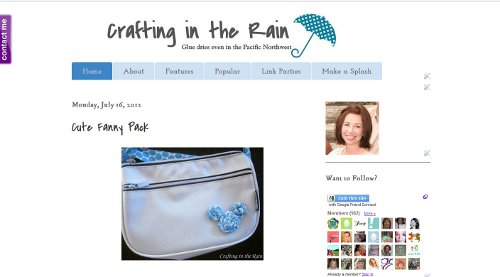
I must say I'm pretty proud of myself that I did it all on my own. With the help of some online tutorials I messed with html, backgrounds, headers, widgets and css.
Here are some things I learned along the way
- It's a good idea to set up a test blog. I went to my blogger account, added a new blog which I made private (so only I could see it) Then as I played with new images or sizing, I wasn't disturbing my real blog.
- Save, or export, your current blog before you go changing any html. That way, just in case you accidentally change some html that you didn't mean to, you have your original blog to re-upload if you need to. (I didn't have any problems, but I saved just in case)
- You can easily upload your own picture for a blog background. Go to Template--Cusomize--Background Click on the little down arrow by the current background image and select upload image. There are also tons of preloaded backgrounds, and some of them can be customized further under Advanced-Background and changing the colors. That's actually how I did mine, but it still feels custom and original!
- Play around with different color palettes. It's great if you have an idea of what you want (Pinterest is a great source of color scheme inspiration) But don't be afraid to throw in a "surprise" color. I wasn't planning on adding any green to my design, but ended up picking a shade that I think goes along great with the whole look.
- Spend some time on your favorite blogs too. See what you like about their layout and feel. Not to say you should be copying their site, you want to be original of course, but do you like where they put their bio, or how it's worded? Does it have a lot of white space or lots of fun colors? Do you like where they have their search button or categories or social media buttons located?
In addition to using GIMP and Make the Cut to design all my new elements, I also used all of these links for help. Go ahead and check them out if you're looking for tips for a blog makeover.
How to create images with more than one link in them--Something Swanky
(like my new header)
How to install a custom header--mayura4ever
How to adjust sidebar title spacing--Southern Speakers
How to center sidebar widgets--SNAP
How to remove the blogger nav bar--Blogger Plugins
To go along with my new colors I redesigned my blog buttons. If you currently have one on your blog somewhere, I'd love for you to grab the updated one (but the old one will still work on your site--I didn't delete it from Photobucket)
Let me know if you have questions about anything else I did here, and I'd love to know what you think about my new look!
Click here if you want to comment


It looks great! And I'm totally going to check out those links right now. I'm super impressed :)
ReplyDeleteI love it!! I'm super impressed that you did it yourself! I ended up giving up. :). Maybe someday I'll try again with all these links you've provided!
ReplyDeleteIt looks great! It looks professionally done. I've been slowly trying to makeover my blog too. Thanks for sharing those links! I'll have to check them out.
ReplyDeleteLove it. I've been using some of those same tutorials to redecorate mine too. :) You did a great job!
ReplyDeleteYou are so talented! Love the changes you made!
ReplyDeleteLooks great! Thanks for the tips!
ReplyDeleteSome really great tips here thanks for the advice
ReplyDeleteGreat new look to your blog Steph! Looks very chic! Thanks for sharing all the links to where you found your info too! I need to update my blog too - they should prove very useful!!
ReplyDeleteThanks for linking to a Round Tuit!
Hope you have a fabulous week!
Jill @ Creating my way to Success
http://www.jembellish.blogspot.com/
It looks great Steph! I love the new look!
ReplyDeleteKathryn
destinationcraft.blogspot.com
I LOVE your new look and this is so informative! Do you think you could stop over and tell me what you think about my blog and set up? My 14 year old helped me do it and it was a nightmare, UGH! Im thinking of maybe changing it up some? Thank you so much! Http://simplysimplisticated4.blogspot.com
ReplyDeleteThe new design looks great! I also just redid my blog all by myself and I am so very proud. We rock!!
ReplyDeleteI love it! Especially your welcome picture on the side!
ReplyDeleteGreat new design and tips! I thought I was following before, but I guess not! I'm following now =)
ReplyDeleteOh I do like your new look and thank you for sharing some very good information! Now to just take the plunge and do it....I need more courage, but I'm working on it!
ReplyDeleteYour blog looks Great! Good tips - Thanks. Visiting from Craft-O-Maniac linkup :)
ReplyDeleteGreat job! Your site looks nice and clean!
ReplyDeleteGreat tips! I am definitely going to give then a try! I have been afraid to mess my blog up...so I haven't tried, so using your first tip will be helpful:) Thanks!
ReplyDeleteHi Dear,
ReplyDeleteNice tips about customization of blogs and how to find ideas. Well explained and straightforward :) Thanks for the mention too.
Have a great week for you :)
Cheers...
Wow, so many helpful tips! Visiting from jugglingactmama.blogspot.com - found you on the Ta-Da Tuesday – hope you’ll come visit me too :)
ReplyDeleteGood tips. I found you via the Tuesday Talent Show from Chef in Training
ReplyDeleteI have linked a pizza I did with leftover roast chicken. Have a good week.
Hmmm.... I'm sure my blog needs a make over. I would love for you to share it and others on my new blog hop Frugal "I Did It!" Tuesday. http://offthegridat-30.blogspot.ca/2012/07/frugal-i-did-it-tuesday-2.html
ReplyDeletegreat tips! I followed you over from Ginger Snap's link party and am a new follower! Hope to see you over at my little blog. :) ~Eva~
ReplyDeleteThanks for sharing! This newbie is going to enjoy (when I have more time) checking out all these great resources.
ReplyDeleteBlessings,
Carrie
http://fiveseventeenrepurposing.blogspot.com
Found you via SNAP. Thank you so much for this! I've been wanting to change a lot of this stuff and now I have the info!
ReplyDeleteGreat Tips! I'd love you to link up to my link up party going on here:
ReplyDeletehttp://itsjustcalledspicy.blogspot.com/
Jen
Great tips...thansk so much! :D
ReplyDeletewhat great tips thank you for sharing stopping by from the Market Yourself Monday
ReplyDeleteGreat tips, thank you. I love your new look!
ReplyDeleteI love the soft colors of your layout. Thanks for the tips. Stopping by from the friday link up.
ReplyDeleteGreat tips! Everything looks beautiful!
ReplyDeleteFeaturing YOU today! Your blog looks great! :) Thank you for linking up to {wow me} wednesday.
ReplyDeleteGinger @ gingersnapcrafts.com
http://www.gingersnapcrafts.com/2012/08/take-look-at-you-my-favorites.html
It looks great! I did my own blog design, too, it's so much fun! I love playing with html and css (which my bf actually doesn't know anything about even if he's a computer whizz!). I wanted to ask what is the font on your header for Crafting in the Rain? It's so cool!!
ReplyDeleteHow did you make that cool welcome box with buttons and photo? Found you via MBC and am your newest follower!-
ReplyDeleteAwesome post...just gave this a shoutout!
ReplyDeletehttp://4you-withlove.blogspot.com/2012/08/blogging-tips-10.html
Marilyn
Your blog redesign is beautiful! I can't believe you did it yourself! I hope to do the same this fall but am stuck on making a logo or blog button that really fits my personality and my blog. You did a wonderful job!
ReplyDelete